
How to Write Instagram Captions for Your Restaurant (That Actually Bring People In)
You've got a great photo of the dish. Then you sit there staring at the empty caption box. "Yum"? A row of emojis? You end up posting nothing, or something generic that gets ignored.
The photo stops the scroll, but the caption is what turns a scroller into a customer. Here's how to write ones that work, and the fast way to never face a blank box again.
Lead with the dish, not "Happy Monday"
A greeting tells people nothing. Start with the food. Name it, describe it, make it sound as good as it looks. "Slow-cooked butter chicken, rich and creamy" does more than any "Happy Monday everyone!"
Give them a reason to act
Don't just describe the food. Give a nudge: a special running today, your hours, where to find you, or a simple "come try it this weekend." You're answering the question the photo creates, which is "where do I get this?"
Keep it short and real
Long paragraphs get skipped. So do captions stuffed with thirty hashtags. Write the way you'd talk to a regular across the counter. A sentence or two with a bit of personality. And let your voice show: a taco truck and a fine-dining spot shouldn't sound the same.
How to make your captions worth reading
A few things that apply to every caption, regardless of tone:
Be specific. "Our most popular dish" means nothing. "The lamb we've been serving every Friday for six years" means something.
Drop the corporate language. Phrases like "we are proud to announce" or "as always, quality is our priority" read like a press release. You're a restaurant, not a company spokesperson.
Keep it short if the photo is strong. If the image does the work, a one-liner or even just a good first line and hashtags is enough. Captions don't have to be long to land.
Use the first line as your hook. Instagram cuts off captions after a couple of lines. Make the first line strong enough that people tap "more."
Don't let the caption be what stops you
You're running a kitchen, not a marketing desk. Nobody has ten minutes to spend thinking up the perfect caption between orders, so the caption becomes the step where posting stalls and then stops.
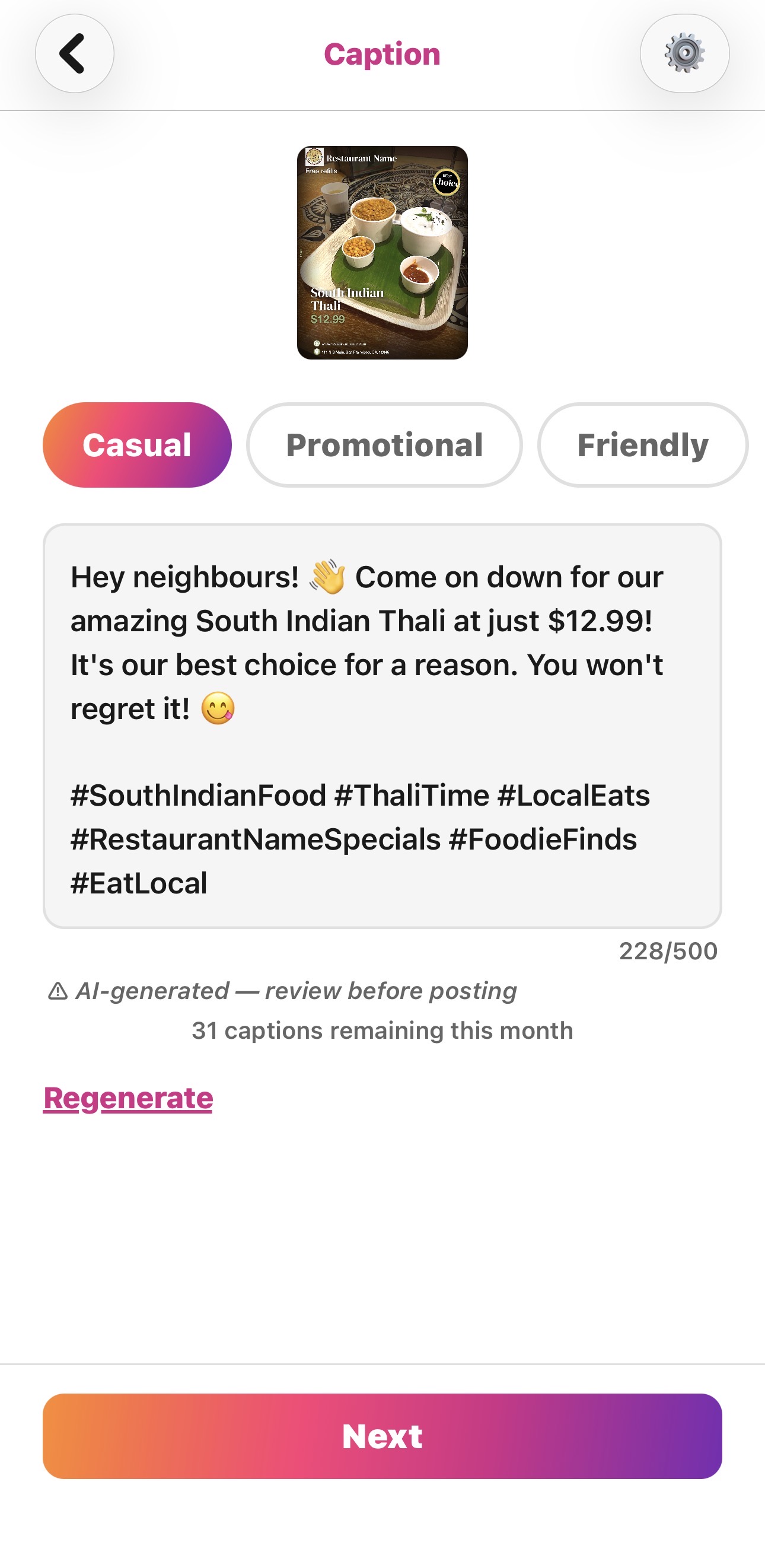
This is where PostMyPlatter helps most. You give it the basics already attached to your post, your restaurant name, the dish and a short description, the price or offer, and your location, and its AI turns them into captions that fit the food in seconds. No blank box, no time lost. It gives you three tones to pick from:
- Casual, for a warm, neighbourly feel
- Promotional, when you're pushing a deal and want urgency
- Friendly, for a community, come-say-hi vibe
Tap the one you like, tweak a word, post.
Put it together fast
A strong post is a good photo plus a caption that makes someone hungry and tells them what to do about it. PostMyPlatter handles both: pick a template, add and enhance your photo, fill in a few details, then choose from three captions in the tone that fits your brand, all in under a minute.
The best caption is the one you actually post. Make it fast, and you'll post one every day.
PostMyPlatter requires a subscription. Try it free on Preview first, no credit card needed.